
Deployment scenario: monitoring a high-traffic retail entrance
When selecting hardware for modern surveillance, this AI Security Cameras: Guide and Best Picks provides the technical framework to balance high-speed detection with minimal false alarms. Unlike traditional motion sensors that trigger based on pixel changes, AI-enabled systems utilize edge-based deep learning to classify objects in real-time.
For a high-traffic store, the primary objective is to differentiate between customers entering the premises and external factors like passing vehicles or fluctuating light levels.
Distinguishing between human movement and environmental noise
Modern AI security cameras rely on Convolutional Neural Networks (CNNs) to process video feeds locally. These algorithms are trained on millions of labeled images, allowing them to extract features—such as the bipedal gait of a human or the specific shape of a vehicle—regardless of the background complexity.
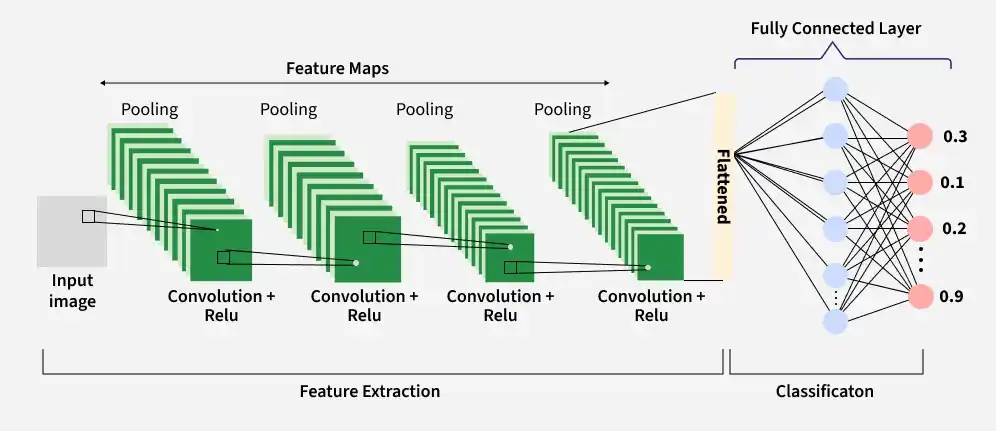
When a shadow moves across the floor or a pet wanders near the entrance, the system compares the visual data against its trained model. If the object lacks the structural characteristics of a human, the camera ignores the movement, effectively filtering out environmental noise.
In practical retail settings, this mechanism significantly reduces the burden on security personnel. For instance, a camera positioned at a glass-fronted entrance often faces issues with light reflections or moving tree branches. Traditional systems would trigger a recording for every gust of wind.
An AI-powered unit, such as the Hikvision AcuSense or the Axis Communications Deep Learning series, ignores these non-human triggers by analyzing the spatial relationship of pixels. This ensures that only genuine customer traffic is logged, saving storage space and reducing the time spent reviewing footage.
When selecting hardware for this environment, prioritize models with a minimum of 4MP resolution and a wide dynamic range (WDR) of at least 120dB to ensure the AI can accurately identify subjects even in high-contrast lighting conditions caused by sunlight hitting the doorway.
Technical criteria for AI security cameras: guide and best picks
Selecting effective AI Security Cameras: Guide and Best Picks requires evaluating how hardware handles data. High-quality AI integration relies on three pillars: image sensor resolution, neural processing unit (NPU) capability, and connectivity stability.
For professional-grade monitoring, prioritize cameras with at least 2K resolution and a minimum frame rate of 20fps to ensure the AI model captures sufficient pixel density for accurate object classification.
On-device processing versus cloud-based analysis
The core distinction in AI security architecture lies in where the inference occurs. On-device processing, often referred to as edge AI, utilizes a local NPU to identify humans, vehicles, or animals directly on the camera hardware.

This approach offers near-zero latency and functions even during internet outages. Privacy is significantly higher here, as video streams do not need to leave your local network for analysis. The trade-off is higher hardware cost and limited computational power compared to massive server farms.
Conversely, cloud-based analysis offloads the heavy lifting to remote servers. These systems can run more complex, evolving algorithms that update frequently without requiring firmware changes.
However, this model introduces latency—often 2 to 5 seconds—between the event and the alert. Furthermore, reliance on cloud analysis creates a privacy bottleneck, as raw video data must be transmitted to external servers for processing, increasing potential exposure to data breaches.
Top-performing models for specific use cases
Hardware selection should align with your specific environmental needs. For residential users seeking a balance of cost and performance, the Reolink Argus 3 Pro stands out. It features integrated PIR sensors combined with on-device AI detection, which minimizes false positives from swaying trees or shadows.
It is an ideal choice for battery-powered, wireless deployments where local storage via microSD is preferred over subscription fees. For enterprise or high-end residential setups, the Ubiquiti UniFi Protect G5 series offers superior reliability.
The G5 Pro, in particular, utilizes a high-performance image sensor that excels in low-light conditions, feeding data into the UniFi Protect ecosystem. This system is designed for users who want complete control over their data, as all AI processing and storage occur on the local UniFi Dream Machine or NVR, eliminating recurring cloud storage costs while maintaining enterprise-level object detection accuracy.
Operational constraints and failure points
While AI security cameras offer significant advancements in automated monitoring, they are not infallible. Their performance relies heavily on the quality of raw data captured by the sensor and the processing power available at the edge.
Users often experience false positives caused by moving vegetation, shadows, or small animals, which can overwhelm notification systems if motion sensitivity thresholds are not calibrated correctly.
Impact of lighting conditions and weather on detection accuracy
Computer vision algorithms struggle when environmental variables degrade image clarity. Infrared (IR) glare is a common culprit; when IR light reflects off nearby surfaces like glass, metal, or even heavy rain droplets, it creates a ‘blooming’ effect that obscures the field of view.
This often results in the camera failing to classify objects accurately, as the neural network cannot distinguish between a person and a distorted light reflection. Heavy precipitation introduces noise that interferes with pixel-based motion detection.
Rain and snow can trigger constant false alerts if the camera uses basic pixel-change detection rather than object-based classification. Even with advanced AI models, extreme weather conditions reduce the effective range of the camera’s detection capabilities.
For instance, a camera rated for 30-meter human detection may see its reliable range drop by 50% during a thick fog or heavy downpour. To mitigate these failures, professional installations prioritize the following technical adjustments:
- High Dynamic Range (HDR) settings: Essential for balancing high-contrast scenes where bright sunlight creates deep shadows that hide potential intruders.
- IR Cut Filters: Mechanical filters that shift during low-light transitions to ensure color accuracy during the day and high-contrast monochrome images at night.
- Placement strategy: Mounting cameras under eaves or protective housings to minimize direct rain contact with the lens, which prevents water droplets from creating refractive artifacts.
- AI Sensitivity Calibration: Configuring the software to ignore specific zones, such as swaying tree branches or busy public sidewalks, to reduce the cognitive load on the detection engine.
Understanding these limitations is vital for setting realistic expectations. No AI system currently matches the nuanced judgment of a human operator, a skill often enhanced by pursuing best AI security certifications, especially in complex, low-visibility environments.
Data privacy and security considerations
Deploying AI security cameras requires a rigorous approach to data governance, as these devices process sensitive biometric and behavioral information. Unlike traditional CCTV, AI-enabled systems often perform edge processing, meaning video analysis happens on the device itself.
While this reduces latency, it necessitates strict local storage management and robust access controls to prevent unauthorized data exfiltration.
Encryption standards for remote access
Securing video feeds during transmission is the most critical defense against man-in-the-middle attacks. When accessing your camera remotely via a mobile app or web portal, ensure your device supports end-to-end encryption (E2EE) using AES-256 standards.

This ensures that even if data packets are intercepted during transit from the camera to the cloud or your smartphone, they remain unreadable without the specific decryption key held by your device.
To verify the security posture of your AI Security Cameras: Guide and Best Picks, check for the following technical requirements:
- TLS/SSL Protocols: Ensure the camera uses TLS 1.2 or higher for all communication between the camera and the cloud server.
- Multi-Factor Authentication (MFA): Never rely on passwords alone. Choose systems that mandate MFA, preferably using authenticator apps rather than SMS, to protect against SIM-swapping attacks.
- Firmware Integrity: Prioritize manufacturers that provide digitally signed firmware updates. This prevents attackers from injecting malicious code into your camera through a fake update process.
- Local Storage Encryption: If your camera uses a microSD card for local recording, ensure the system supports hardware-level encryption. If the card is physically stolen, the footage should be inaccessible without the camera’s unique hardware ID.
Finally, be wary of “default” settings. Most consumer-grade AI cameras ship with universal login credentials. Immediately change these to a unique, complex passphrase upon installation.
Disable UPnP (Universal Plug and Play) on your router to prevent the camera from automatically opening ports to the public internet, which bypasses your firewall protections. By isolating your security cameras on a dedicated VLAN (Virtual Local Area Network), you can further minimize the risk of a compromised camera providing a gateway into your primary home or office network.
Frequently Asked Questions
What is the primary difference between standard motion detection and AI-based detection?
Standard motion detection triggers alerts based on pixel changes, often leading to false positives from wind or shadows. AI-based detection uses edge computing to classify objects, specifically identifying humans, vehicles, or animals to reduce irrelevant notifications.
Subscription requirements for AI security camera functionality
Most AI cameras offer local storage options via microSD cards or NVRs for basic recording. However, advanced features like facial recognition, package detection, or long-term cloud storage often require a monthly subscription service.