
Memory exhaustion during large dataset processing
Identifying performance bottlenecks in Python programming for data science requires understanding how Python manages memory when handling datasets that exceed available RAM. Unlike compiled languages, Python objects carry metadata, such as reference counts and type information, which can consume several times the space of the raw data itself.
For data scientists, this often manifests as a MemoryError when attempting to load large CSV files or perform vectorized operations on high-dimensional arrays.
Object overhead in native data structures
Native Python lists are essentially arrays of pointers to objects scattered across memory. Each integer in a list is a full Python object, requiring 28 bytes, plus the 8-byte pointer in the list structure.
In contrast, NumPy arrays store data in contiguous blocks of memory using fixed-size C-types. For example, a NumPy array of 64-bit integers uses exactly 8 bytes per element with zero overhead per item. When processing a dataset with 10 million rows, a Python list of integers might consume over 300MB, while an equivalent NumPy array requires only 80MB. Transitioning from standard lists to NumPy or Pandas structures is the most effective way to reduce memory footprint in Python programming for data science.
Lazy evaluation strategies for memory efficiency
Loading an entire dataset into memory is rarely necessary for iterative tasks. Lazy evaluation allows you to process data piece-by-piece, keeping only the current chunk in RAM. Using Python generators instead of list comprehensions ensures that values are computed on-the-fly rather than stored in memory.
For instance, when reading large files, use the chunksize parameter in pandas.read_csv() to iterate through the file in segments:
import pandas as pd # Processing a 10GB file in 100MB chunks
for chunk in pd.read_csv('large_data.csv', chunksize=100000): process(chunk)
This approach keeps the memory usage constant regardless of the total file size. By combining chunking with generators, you can perform complex transformations on terabyte-scale datasets without triggering system-level swapping or crashing your environment.
Execution latency in Python programming for data science
Performance bottlenecks in data-heavy Python applications often stem from how the interpreter handles memory and CPU cycles. When processing large datasets, the overhead of Python’s dynamic typing and object-oriented nature can lead to significant execution latency.
Identifying these delays requires profiling tools like cProfile or line_profiler to pinpoint specific functions consuming excessive clock time, rather than relying on intuition.
Vectorization as a performance diagnostic
Replacing explicit loops with NumPy and Pandas vectorized operations is the most effective way to diagnose and resolve performance issues. Python loops are inherently slow because they require type checking and object overhead for every iteration. By contrast, vectorized operations push these loops into pre-compiled C code, which executes at near-native speed.
For example, calculating the square root of a million-element array using a list comprehension is significantly slower than using numpy.sqrt(). If your profiling data shows high execution time within a loop, it is a clear diagnostic signal that the operation should be vectorized. This shift not only reduces latency but also minimizes memory fragmentation by utilizing contiguous memory blocks.
Global Interpreter Lock constraints
The Global Interpreter Lock (GIL) is a mutex that prevents multiple native threads from executing Python bytecodes at once. In CPU-bound data science tasks, such as complex mathematical transformations or model training, the GIL forces threads to serialize, effectively neutralizing the benefits of multi-threading.
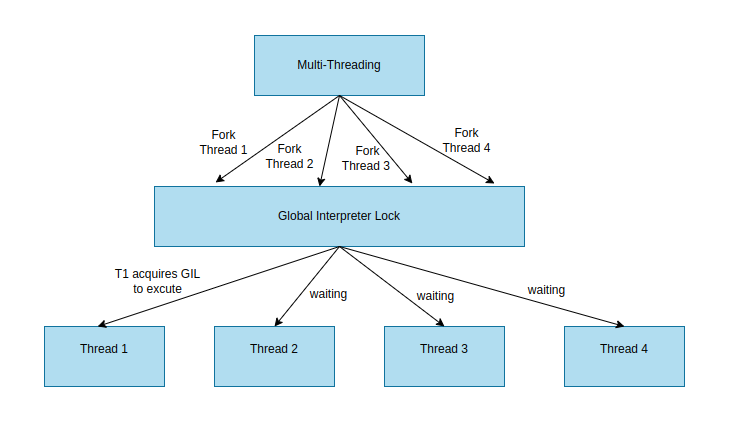
If your application attempts to parallelize heavy computation using the threading module, you will likely observe that performance does not scale with the number of CPU cores. To overcome this bottleneck, developers should follow a structured python development roadmap to shift from multi-threading to multi-processing. The multiprocessing module bypasses the GIL by spawning separate memory spaces and individual Python interpreters for each process. Alternatively, offloading heavy computations to C extensions or using frameworks like Dask or Ray allows for true parallel execution, ensuring that your data pipelines remain efficient as the volume of processed information increases.
Dependency conflicts in production environments
Dependency hell remains a primary cause of runtime failures when deploying machine learning models. In Python programming for data science, projects often rely on a complex web of libraries like NumPy, Pandas, and Scikit-learn.

If your production environment uses a different version of a shared dependency than your development machine, you risk silent numerical errors or abrupt crashes due to deprecated API calls. When scaling these models, firms often prioritize data driven marketing to ensure their technical infrastructure aligns with business growth.
Environment isolation with virtual environments
To ensure consistent execution, you must isolate your project dependencies. Using venv or Conda prevents global package pollution and ensures that the exact library versions tested during development are replicated in production.
For standard Python projects, venv is the lightweight, built-in solution. You create an isolated environment by running:
python -m venv venv_name
source venv_name/bin/activate
pip install -r requirements.txt
However, data science workflows often involve non-Python dependencies, such as C++ compilers or specific CUDA versions for GPU acceleration. In these scenarios, Conda is superior because it manages binary-level dependencies across different languages. A typical workflow involves exporting your environment configuration to a YAML file:
- Export:
conda env export > environment.yml - Recreate:
conda env create -f environment.yml
Beyond simple isolation, you should implement a lock-file mechanism. Tools like pip-compile (from pip-tools) or Poetry generate a requirements.txt or poetry.lock file that pins every sub-dependency to a specific hash. This practice eliminates the “it works on my machine” syndrome by ensuring that every environment installs the identical byte-for-byte version of every package. Relying on loose versioning, such as pandas>=1.0.0, is a common mistake that leads to unpredictable behavior when a new minor update introduces breaking changes to your data processing pipeline.
Data serialization and I/O bottlenecks
Data ingestion is frequently the silent killer of performance in data science pipelines. When working with large datasets, the time spent reading from and writing to disk often dwarfs the actual computation time.
Python’s standard library functions, such as pandas.read_csv(), are convenient but inefficient for multi-gigabyte files because they require parsing text-based formats into memory, which is CPU-intensive and memory-heavy.
Parquet vs CSV performance trade-offs
Choosing the right file format is the most effective way to optimize I/O. CSV files are human-readable but lack schema metadata, forcing the Python interpreter to infer data types during every read operation. This inference process is slow and prone to errors.
In contrast, Apache Parquet is a columnar storage format that provides significant performance advantages:
- Schema Enforcement: Parquet stores data types alongside the data, eliminating the need for expensive inference during ingestion.
- Columnar Projection: You can read only the specific columns required for your analysis, drastically reducing the amount of data loaded into RAM.
- Compression Efficiency: Parquet utilizes Snappy or Gzip compression natively, resulting in smaller file sizes on disk compared to uncompressed CSVs.
For high-performance Python programming for data science, transitioning from CSV to Parquet can reduce load times by 5x to 10x. If you must use CSVs, consider using the pyarrow engine within pandas, which leverages C++ under the hood to accelerate parsing. In sectors like medical research, enhancing healthcare data security is just as critical as optimizing the speed of these ingestion pipelines.
Alternatively, for massive datasets, utilize dask or polars, which support lazy evaluation and parallelized I/O, ensuring that your system does not stall while waiting for disk operations to complete. Beyond file formats, consider the physical location of your data. Network-attached storage (NAS) or cloud buckets like AWS S3 introduce latency that local SSDs do not. If your workflow involves frequent small reads, caching data locally or using a memory-mapped file approach with numpy.memmap can prevent the I/O bottleneck from throttling your entire execution pipeline.
Frequently Asked Questions
Common causes for slow Python code during large-scale data processing
Performance issues in data science workflows often stem from the Global Interpreter Lock (GIL), inefficient memory management, or the use of native Python loops instead of vectorized operations provided by libraries like NumPy or Pandas.
Diagnostic methods for isolating script performance bottlenecks
You can use profiling tools such as cProfile, line_profiler, or memory_profiler to pinpoint specific functions or lines of code that consume the most CPU time or memory.